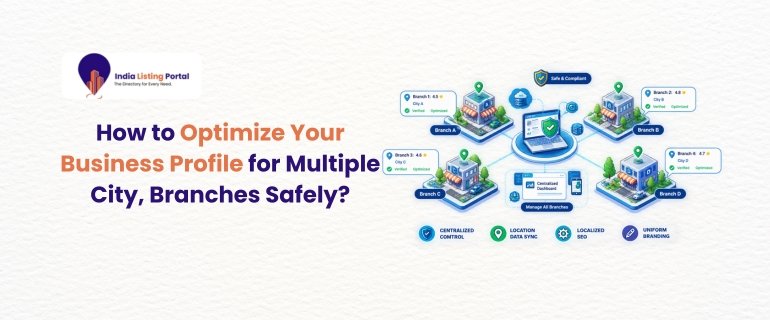
Why Multi-Branch Listings Need a Careful Approach?
Opening up a second or third branch is exciting, but so is the risk over the internet. Having several business profiles optimized in multiple cities, but having an incorrect listing or even an address that doesn't exist can lead to a location being suspended overnight.
Customers are looking for city names, "near me" terms, and map results, and they end up on a branch that Google feels is the most reliable. This guide explains Multi-Location SEO in detail, so that none of the branches is discovered in violation of Google's guidelines. It's for business owners, marketers, and SEO professionals who have more than a single location and desire continual development rather than quick-fix backfires.
Start With Clean Business Profile Optimization
Secure the base before working on any of the branches. Business Profile Optimization is more effective if all listings go by the same simple rules.
Make a master sheet with one row for each branch. Include these fields:
-
Legal business name and the exact name shown on the signboard
-
Full street address, including landmark if available, to assist customers
-
A local phone number that connects to THAT branch
-
Opening hours, including holiday timings
-
Primary and secondary categories
-
Website URL for that branch
This sheet becomes your single source of truth. All team members (or all agencies you use) should update the sheet first, and the listings second. It avoids the silent incongruities which can bewilder customers and search engines.
Multi-Location SEO: Give Every Branch Its Own Identity
The only way to approach Multi-Location SEO is to look at each location as a separate business, one that happens to share a brand. Google is looking for a real location and actual customers.
Here is what each branch listing needs:
-
A verified staffed address. Only list locations where your team meets customers during stated hours. Virtual offices and co-working desks without staff are a common reason for suspension.
-
Accurate categories. Select the category that fits the description of that branch. If there are differences in services, then different branches can have different secondary categories.
-
Original photos. Upload pictures of that exact branch, including the storefront, interiors, and team. To use the same set of images in various cities is lazy and not helpful.
-
Branch-specific services and offers. If the Pune branch will be installing and the Delhi branch will not say so.
Our post on why local listings need more than NAP data is worth reading before you add a new location.
Keep Names, Addresses, and Phone Numbers Consistent
Trust signals - consistency across directories. If the branch is actually signed as “Brand Name – City”, use this format everywhere; otherwise, use the business name format. Avoid entering city names or terms into the name field. This is one of the quickest ways to get a suspension.
Look at your listing on key directories and industry portals as well. If the phone number or old address is not the same, it causes duplication in your reviews and rankings. Our local listing and directory guides cover how to clean these up.
Multiple City SEO: Build Location Pages That Are Not Copies
Your Google listing is only half the picture. Strong Multiple City SEO also needs a dedicated page on your website for each branch.
Each location page should include:
-
The branch address, phone number, hours, and an embedded map
-
A short description of the area you serve and nearby landmarks
-
Services available at that branch
-
Reviews or testimonials from local customers
-
Local business schema markup
Don't use the "replace the city name" trick. Pages that only differ in a place name are thin content pages which rarely rank. Include some sentences about the real neighbourhood, real questions people ask customers, and include photos from the real branch. Then connect each location page from your main "Locations" page and from the location's website link. Service-based? See how business listings help service-based businesses.
Safe Practices vs Risky Shortcuts
Some strategies appear to be smart but can harm your listings. This fast comparison will help your team make a decision.
|
Area |
Safe Approach |
Risky Shortcut |
|
Address |
Real, staffed branch |
PO box or virtual office |
|
Business name |
Actual signboard name |
Keywords or city stuffed in |
|
Listings |
One per branch |
Duplicate listings for the same branch |
|
Website pages |
Unique page per location |
City-name swap templates |
|
Reviews |
Genuine requests after service |
Bought or incentivised reviews |
Reviews, Posts and Ongoing Monitoring
A listing is never "done". Once set up, create the basic routine for each branch.
Invite positive customers to write reviews in the checkout area via a short link or QR code. Respond to all positive or negative reviews from the proper branch account. Post offers, events, and updates regularly, and maintain up-to-date holiday hours.
Implement a shared access structure also. Use user permissions on the profile for adding managers rather than sharing a password, and have at least two owners to prevent the loss of access if someone leaves. A monthly check of calls, direction requests, and search queries per branch will show which locations need attention. To learn more about how listings can work together, read our full guide to local business listings.
Conclusion
For best safety in optimizing your business profile across cities, use a clean master sheet, treat each branch as if it were a real location, and keep names, addresses, and phone numbers consistent. Have a different location page for each listing, do not use shortcuts such as virtual offices or keyword-stuffed names, and maintain reviews and posts. Multiple City SEO steadily fosters trust, branch by branch, and your entire brand benefits.
FAQs
Q1. How many Google Business Profile listings can one business have?
There is no set limit. You can list each and every real branch where customers can go in or be served, provided that each branch fulfils Google's requirements.
Q2. Can I use the same phone number for all my branches?
It's not a good idea, to say the least. Having a local telephone number at each location contributes to the brand's presence and customer service.
Q3. How do I avoid duplicate listings when I add a new branch?
Look up the address on Google Maps before creating! Don't create a new listing if there is already one, and delete or consolidate duplicate listings.
Get in touch with us at https://indialistingportal.com/contact or write to support@indialistingportal.com.