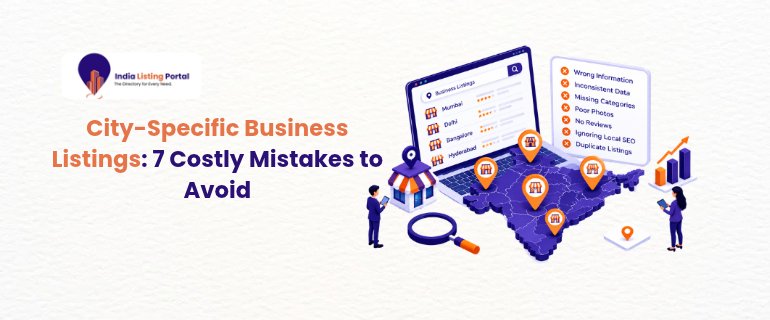
Why City-Specific Business Listings Can Make or Break Local Visibility
Moving to a new city is exciting, but moving to a new pin on the map is only half the work. City-specific business listings give search engines and AI tools details about your location, products, and local customer trust. If done well, they will help you become visible to any searcher looking for a service within their own neighbourhood.
Done badly, they do the opposite. A wrong phone number or a duplicate description can cause Google to show multiple profiles for your company, leading customers down the wrong path. Google says local results rely mainly on relevance, distance, and prominence, and your listings influence all three.
This guide will show you 7 major mistakes that slow down local SEO, and how to fix them before they drain you of leads.
Key Takeaways
- Keep your name, address, and phone number identical everywhere.
- One location should mean one listing, with its own city content.
- Follow Google's rules on addresses and business names.
- Select appropriate local directories rather than just many.
- Fresh reviews and information keep listings useful to people and AI tools.
Mistake 1: Ignoring NAP Consistency Across Cities
NAP stands for name, address, and phone number, and search engines match these elements across all websites that mention you. A Pune signal that reads "Shop 4, MG Road" is confused by a directory that reads "4, M.G. Rd". Ten times that many cities, and the confusion escalates rapidly.
AI tools can also rely on the same public sources, which can add to NAP consistency. Conflicting details increase the chance that an incorrect address will appear.
To fix, enter one master record for each city: Business name, formatted business address, city phone number, and city website URL. Copy and paste it word for word into all listings. If you run several branches, this guide to optimizing a business profile for multiple city branches explains how to keep each one separate and safe.
Duplicate Listings and Copy-Paste Content Hurt Local SEO
Mistake 2: Creating Duplicate Listings for One Location
Duplicate listings are typically accidental. A business is registered by a former employee, a directory automatically creates a page, or an old address remains after a business moves on. Customers then see two phone numbers, and reviews split between profiles.
Check your business name with the city every few months. Claim, merge, or request removal of anything that shouldn't exist. Duplicate listings left alone tend to resurface, so treat this as routine upkeep.
Mistake 3: Using the Same Text for Every City
Changing only the city name in the same description is easy, but it doesn't make anyone want to choose you over a competitor. Strong city-specific business listings prove you know the area.
For each, write around local facts: the neighbourhoods you serve, the landmarks nearby, the services that are popular in that city, and the staff that work there. 80 to 100 original words are better than the pasted template.
Google Business Profile Mistakes That Risk Suspension
Mistake 4: Using Virtual Offices or Fake Addresses
A prestigious address in a large city sounds good if you're running from somewhere else. Google doesn't allow it: a rented mailing address where you don't actually work isn't eligible for a Business Profile. Getting suspended right after launch is a waste of effort.
Utilize a genuine site that your team operates. If you only travel to customers, select the service-area configuration and set up areas.
Mistake 5: Stuffing Keywords Into Names and Picking the Wrong Category
Putting "Best Dentist in Mumbai" in your name might seem like a good idea, but Google Business Profile names should be the same as the name in real life, and having too many additional words could result in your suspension.
Categories are just as important. Choose the main categories that are the key services you offer and afterwards add secondary ones sparingly. For a closer look at map visibility, see how to dominate Google Maps with city-wise listings.
Weak Local Citations and Neglected Reviews
Mistake 6: Chasing Quantity Over Quality in Local Citations
Local citations are mentions of your business details on directories and city sites. Many owners submit to hundreds of low-quality directories, hoping volume helps. It rarely does.
Google notes that prominence draws on information from across the web, including links, articles and directories. Prioritise respected directories, industry portals and city-focused sites that real customers use. This post on how city-wise listings build local authority is an example.
Mistake 7: Letting Listings Go Stale
Listings are not "set and forget. Hours change, phone numbers get replaced, and festive timings are forgotten. Unanswered reviews also signal neglect, and Google uses review scores and review counts for local rankings.
Set a monthly reminder to check hours, photos, services, and reviews for each city. Be polite to all reviews, even bad ones. Up-to-date, accurate information also helps AI search tools provide cleaner results.
Conclusion
City-specific business listings work best when they are accurate, unique, and maintained. We discussed standardizing NAP details, removing duplicate listings, writing original city content, following Google Business Profile guidelines, choosing quality local citations, and refreshing reviews.
Tackle these seven elements, and your local SEO base will be stronger in every city you visit, on every search engine and AI platform. Begin with one audit; fix the largest problems first, then audit monthly.
FAQs
Q1. How many city-specific business listings does my company need?
One per site of work and your customers' access. If you go only to customers, it's better to have only one service-area profile, which you give the name of the cities you service, than to open service-area profiles at addresses that you don't.
Q2. How do I remove duplicate listings for the same address?
Search your business name, your phone, and address, and then list all the results. Keep the verified profile with reviews and photos, upload any extras to Google or directories, and keep any listings you maintain up to date.
Q3. How often should I check NAP consistency across local citations?
Conduct a brief review once a month and a complete audit four times a year. Recheck anytime there is a change in brand, phone numbers, or a change in location; these are the times inconsistencies show up.
Need an expert's gaze on your city-wise listings? Please contact us via our contact page or by email: support@indialistingportal.com